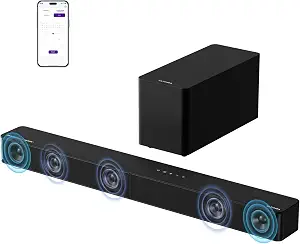
ULTIMEA 5.1CH Surround Sound Bar System with Dolby Atmos, Poseidon M60
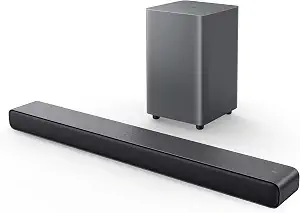
TCL S55H 2.1 Sound Bar with Wireless Subwoofer for Smart TV
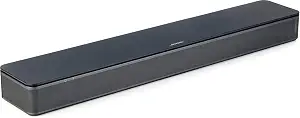
Bose TV Speaker
Best Soundbar Buying Guide — Black Friday Deals 2026
A soundbar shortlist is most useful when it starts with the kind of TV setup you want, not a Black Friday banner. These options take different approaches: ULTIMEA pairs a 5.1-channel bar with a wired subwoofer and extensive app adjustments; TCL combines a 2.1 soundbar with a wireless subwoofer; and Bose keeps its TV speaker compact, with a remote dialogue mode. Before checking a Black Friday offer, decide which connections your television can use, how much equipment you want to place, and whether your priority is adjustable surround sound, a wireless bass component, or speech-focused controls. Then compare the exact listing and included setup details.
ULTIMEA 5.1CH Surround Sound Bar System with Dolby Atmos, Poseidon M60
Check Price on Amazon
Best Overall is an editorial choice for shoppers who want a system with multiple listed ways to shape the sound. The ULTIMEA Poseidon M60 is a 5.1-channel soundbar system with Dolby Atmos, five built-in speakers including two side-firing drivers, and a 5.25-inch wired subwoofer with BassMX Technology. That combination gives you several distinct parts to account for in the room, rather than a bar alone. If you are considering it during Black Friday, first picture where the bar and wired subwoofer would sit and whether that arrangement suits your TV area.
The app offers a 10-band graphic EQ, 121 sound presets, and 13 adjustable surround levels. These are useful details for someone who wants controls to explore across different kinds of viewing, but a long feature list is not a reason to assume you will use every adjustment. Consider whether you like to tailor sound or would rather leave settings alone. For this model, the available controls make it a fitting Best Overall pick among these choices for shoppers who value options, not a claim that it is best for every room or listener.
For a connection check, the listed inputs and wireless option are HDMI eARC, Optical, and Bluetooth 5.4. Compare those names with the ports and devices you intend to use before relying on a particular route. The listed peak power is up to 300W; treat that as a specification to compare, not a guarantee of how loud or immersive the system will sound in your room. Dolby Atmos is part of the stated format description, while your setup and listening preferences remain important parts of the decision.
The wired subwoofer is a practical distinction to weigh against the other layouts here: it means your placement plan should account for a cable, not only the subwoofer’s footprint. Black Friday can make a tempting headline easy to focus on, so check the exact Poseidon M60 listing and variant, then make sure its stated connections and component arrangement match your plans. Choose it if a dedicated subwoofer and app-based sound adjustments are priorities; if you want fewer placement decisions or a simpler speech control, compare the TCL and Bose options before deciding.
Key specs
| Audio channels | 5.1 Channel with Dolby Atmos |
| Connectivity | HDMI eARC, Optical, Bluetooth 5.4 |
| Subwoofer | 5.25-inch Wired Subwoofer with BassMX Technology |
| Peak power | up to 300W of peak power |
| Soundbar speakers | Five built-in speakers, including two side-firing drivers |
| App controls | a 10-band graphic EQ, 121 sound presets, and 13 adjustable surround levels |
TCL S55H 2.1 Sound Bar with Wireless Subwoofer for Smart TV
Check Price on Amazon
Best Budget is the supplied editorial label for the TCL S55H, not a claim about the lowest live price or a market-wide ranking. Its stated layout is a 2.1 soundbar with a wireless subwoofer, and the soundbar measures 3.86"D x 31.89"W x 2.36"H. That combination may suit a shopper who wants a separate bass component without planning a wire between it and the bar. For Black Friday, compare the exact offer and variant rather than assuming the label means a particular discount or final cost.
The S55H lists Dolby Atmos, DTS Virtual:X, and Surround Sound, along with a maximum output of 220 watts. These are useful points to match against your preferences, but format names and an output figure do not promise a particular experience in every room. If you mainly want to compare the formats offered, this model gives you several explicitly named options to consider. If you are prioritizing a 5.1-channel arrangement or a large set of app adjustments, the ULTIMEA has those particular stated features instead.
A connection checklist for the TCL can include Auxiliary, Bluetooth, HDMI, Optical, and USB. It also lists AI Sonic Auto Room Calibration. Those facts may help narrow your questions: identify the connection you expect to use and decide whether room calibration is a feature you want to consider. Avoid assuming that the presence of a port or format settles every compatibility question; check your television and the exact listing. In a Black Friday comparison, write down the connection route and relevant setup details before weighing the offer.
The wireless subwoofer changes the placement question compared with a wired component: you can focus on where the bar and subwoofer can each go without planning a connecting subwoofer cable. That distinction does not mean the system needs no cables at all; its listed connections include wired options, so check your intended TV route. The Best Budget designation makes this a reasonable shortlist candidate when the wireless subwoofer and stated formats fit your priorities. Confirm the complete Black Friday offer and variant rather than treating the label as proof of a bargain.
Key specs
| Audio formats | Dolby Atmos, DTS Virtual:X, Surround Sound |
| Maximum output | 220 watts |
| Room calibration | AI Sonic Auto Room Calibration |
| Connections | Auxiliary, Bluetooth, HDMI, Optical, USB |
| Soundbar dimensions | 3.86"D x 31.89"W x 2.36"H |
| Subwoofer connection | Wireless |
Bose TV Speaker
Best for dialogue-focused TV viewing is an editorial label grounded in the Bose TV Speaker’s remote control: it enables a dialogue mode to further enhance speech, or a bass boost for more depth. That gives a shopper with a specific speech-related preference a concrete control to consider. It does not establish how any individual program will sound, so think about whether you would actually use a dedicated dialogue setting. Black Friday shoppers can compare this feature with the more extensive app controls on the ULTIMEA or the formats and calibration listed for the TCL.
The Bose uses two angled full-range drivers and has dimensions of 2.21" H x 23.38" W x 4.02" D. Those details can help you consider how the speaker might fit in your TV area; compare the measurements with your available space rather than assuming a particular placement will work. Its compactly stated dimensions and two-driver layout present a different kind of setup question from systems with separate subwoofers. Decide whether a single speaker is closer to the arrangement you want, and check the actual space before selecting it.
Its listed connections are Bluetooth version 4.2, HDMI ARC, Optical in, AUX in, and USB for service only. The product information says it can connect up to three devices through the HDMI, Optical in, and AUX in inputs. For TV setup, an optical audio cable is included, while an HDMI cable is sold separately. If HDMI is your preferred route, account for that separate cable when comparing a Black Friday offer; if you plan on optical, confirm that route against your television and the listing.
The speaker is also compatible with the Bose Bass Module 500 or 700, with a Bose Bass Module Connection Cable or standard 3.5 millimeter audio cable required and sold separately. This makes future component plans worth checking before checkout: compatibility is stated, but those additional items are not included in the described connection details. The Best for dialogue-focused TV viewing label is about the remote’s listed dialogue mode, not a broad claim of superiority. When comparing Black Friday listings, verify the exact product and account for any separately sold cable or module relevant to your plan.
Key specs
| Dimensions | 2.21" H x 23.38" W x 4.02" D |
| Drivers | 2 angled full-range drivers |
| Connectivity | Bluetooth version: 4.2 / HDMI ARC (Audio Return Channel) / Optical in / AUX in / USB (for service only) |
| Device connections | Connect up to 3 devices through the inputs (HDMI, Optical in, and AUX in) |
| TV setup | via an optical audio cable (included) or an HDMI cable (sold separately) |
| Remote control | enables a dialogue mode to further enhance speech or add a bass boost for more depth |
| Bass module compatibility | compatible with the Bose Bass Module 500 or 700 and requires the Bose Bass Module Connection Cable or a standard 3.5 millimeter audio cable, sold separately. |
Which listening goal should lead your shortlist?
Start by naming the listening task you care about most. If you want a system with a stated 5.1-channel layout, Dolby Atmos, side-firing drivers, and app adjustments, the ULTIMEA puts those items together in one set of facts. If a wireless subwoofer is central to your component plan, the TCL is the option here that lists one. If your clearest priority is a remote dialogue mode, the Bose has that specific control. These distinctions are more useful than treating all soundbars as interchangeable or assuming that one format name settles the choice.
Use format and adjustment details as questions to resolve, not promises about what you will hear. Dolby Atmos appears in the ULTIMEA and TCL descriptions, while TCL also lists DTS Virtual:X and Surround Sound. Bose’s supplied facts emphasize its drivers, connections, and remote modes instead. Consider what you watch and which controls you are likely to reach for. A Black Friday shortlist built around those priorities is easier to evaluate than one built around whichever feature sounds most impressive in isolation.
Trace the TV signal before comparing formats
Check the connection your television can use and compare it with the specific soundbar’s listed inputs. The ULTIMEA lists HDMI eARC, Optical, and Bluetooth 5.4; TCL lists Auxiliary, Bluetooth, HDMI, Optical, and USB; Bose lists HDMI ARC, Optical in, AUX in, and USB for service only, as well as Bluetooth version 4.2. These names are not interchangeable. Match the exact port wording to your intended setup and confirm the cable or route you plan to use before you settle on a model.
Cable details can change the practical comparison. Bose specifies that an optical audio cable is included and an HDMI cable is sold separately. The ULTIMEA’s subwoofer is wired, while the TCL identifies its subwoofer connection as wireless; neither fact by itself settles the TV-to-bar connection. On Black Friday, avoid assuming a featured offer includes every accessory you expect. Check the exact listing and variant, identify what you need for your chosen connection, and compare only offers that suit that plan.
Plan the bar, bass component, and available space
The physical arrangement differs as much as the feature sets. ULTIMEA includes a wired subwoofer, so consider where it can sit and how you will account for its connecting wire. TCL’s wireless subwoofer avoids that particular connection between the bar and subwoofer, but you still need to decide where each component belongs. Bose’s supplied description centers on the TV Speaker and separately notes compatibility with Bose Bass Module 500 or 700. Think through the setup you want now, along with any separately purchased component you might consider later.
Measurements are useful only when compared with your own furniture and TV area. The TCL soundbar is listed as 3.86"D x 31.89"W x 2.36"H, while Bose gives 2.21" H x 23.38" W x 4.02" D. Check those exact dimensions against your available space and the placement you have in mind. No dimension alone tells you whether a particular location will suit your room. For a Black Friday decision, make the placement plan first; then check that the exact model and offer correspond to the setup you can accommodate.
Choose controls for the moments you want to adjust
Different controls answer different shopper questions. ULTIMEA lists a 10-band graphic EQ, 121 sound presets, and 13 adjustable surround levels in its app. That may appeal if you want a range of settings to explore, but consider whether you prefer adjusting sound or keeping your setup straightforward. Bose’s remote has a dialogue mode to further enhance speech and a bass boost for more depth. A shopper focused on those two stated options may find that control more relevant than a long list of presets.
TCL lists AI Sonic Auto Room Calibration, alongside Dolby Atmos, DTS Virtual:X, and Surround Sound. Treat calibration as a listed feature to weigh, not a guarantee of a particular result in your room. Compare it with the manual adjustments or remote modes that matter to you. During Black Friday, keep a note of your actual listening priority beside each candidate. That helps distinguish a feature you might use regularly from one that merely looks compelling on a product page, without making unsupported assumptions about sound quality.
Make the Black Friday comparison about the exact setup
A useful Black Friday comparison starts with the precise product name and variant, then checks the connection route, included components, and any separately sold items relevant to your plan. Do not infer a promotion, saving, or included accessory from a headline. For Bose, the product details explicitly identify the optical cable as included and HDMI cable as sold separately; its compatible bass modules and required connection cable are also described as sold separately. For another model, check the live offer itself for the details that matter rather than carrying assumptions from a different listing.
Write down what you need before opening offer pages: TV input, preferred component arrangement, and the sound controls you value. Then compare the exact listing against that short checklist. The ULTIMEA may align with a wired subwoofer and app adjustments; TCL may align with a wireless subwoofer and its listed calibration; Bose may align with remote dialogue mode and the TV connections it specifies. These are different fits, not a price ranking. If a Black Friday listing leaves an important setup detail unclear, verify it before making the purchase decision.
Make your Black Friday choice
The right choice depends on which stated features solve your own setup questions. Put ULTIMEA on the shortlist for its 5.1-channel system and broad app adjustments, TCL for its wireless subwoofer and listed calibration, or Bose for its remote dialogue mode and compact stated dimensions. Before checkout, match the connection to your television, plan component placement, and account for accessories identified as sold separately. Black Friday can be a useful time to compare offers, but the exact variant and complete setup matter more than a banner. Choose only after the listing fits the way you intend to watch and connect.