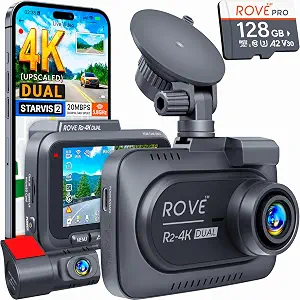
ROVE R2-4K Dual Dash Cam Front and Rear
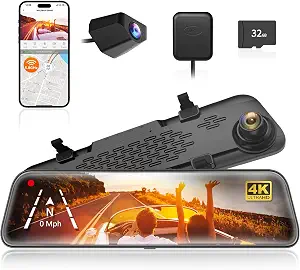
WOLFBOX G840S 12" 4K Mirror Dash Cam Backup Camera with 32GB Card and GPS
Best Dash Cam Buying Guide — Black Friday Deals 2026
A dash cam decision is less about collecting the longest feature list than choosing a recording arrangement you can make sense of later. Do you want footage from the front and rear, a discreet single-camera setup, or a large mirror display? The ROVE R2-4K Dual, Garmin Dash Cam Mini 3 and WOLFBOX G840S answer those questions in different ways. For Black Friday, treat each listing as a specific configuration to verify—not as proof of a discount or a reason to rush. Compare the exact model, included card and any power or service requirements against how you expect to use the camera.
ROVE R2-4K Dual Dash Cam Front and Rear
The ROVE R2-4K Dual earns the Best Overall label in this guide as an editorial pick for shoppers who want forward and rearward recording in one setup. Its front camera captures at 2.5K (QHD) and intelligently upscales to 4K (2160P), while the rear camera records at Full HD 1080P. That distinction is worth keeping in mind when deciding what you want to examine later: the front and rear views do not have the same stated recording resolution. The Sony STARVIS 2 IMX675 5MP image sensor is another specific part of the front-camera configuration to consider.
Think about your own reason for choosing a dual-camera dash cam. If you want both front and rear recordings available for review, this model gives you those two viewpoints; the relevant tradeoff is that you will need to consider both cameras when planning placement and setup. The built-in GPS may also matter if you want GPS as part of the camera itself. For a shopper comparing Black Friday listings, the included free 128GB microSD card is a concrete package detail to check against the exact offer, rather than assuming every listing or variant has identical contents.
The product supports direct video downloads to a smartphone over Wi-Fi at up to 20 MB/sec. That gives you a stated route for moving recordings to your phone; consider whether that fits the way you expect to find and review a clip. Parking mode needs a separate decision: a hardwire kit is required, and it is not included with the package. If parked-car monitoring is part of your plan, account for that requirement before comparing offers. This camera suits a shopper who values front-and-rear footage, built-in GPS and included storage, and is willing to plan for the additional parking-mode hardware if needed.
Key specs
| Front recording | front camera captures at 2.5K (QHD) and intelligently upscales to 4K (2160P) |
| Rear recording | the rear camera records at Full HD 1080P |
| Image sensor | Sony STARVIS 2 IMX675 5MP image sensor |
| Wi-Fi downloads | download your recorded videos directly to your smartphone at up to 20 MB/sec |
| GPS | comes with built-in GPS |
| Included memory card | free 128GB microSD card |
| Parking mode | A hardwire kit is required (not included with the package). |
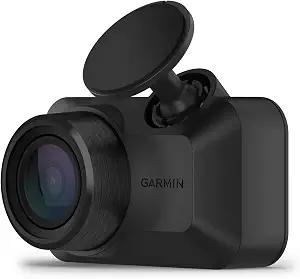
Garmin Dash Cam™ Mini 3
The Garmin Dash Cam Mini 3 is the Best Budget choice as an editorial fit for shoppers who put a simple single-camera recording arrangement ahead of a large display or dual-camera recording. The label does not claim a lower current price or a confirmed Black Friday saving. Its stated video is 1080p HD, with a wide 140-degree field of view designed to capture details in bright and low light. A built-in Garmin Clarity polarizer lens reduces windshield glare, a feature to weigh if glare is one of the details you want the footage to address.
For a driver who prefers spoken controls, voice commands can save video and start or stop audio recording. The listed languages are English, German, French, Spanish, Italian and Swedish, so check that qualification against your needs rather than assuming voice control works in any language. The camera also automatically records and saves incident video with the date and time. Those functions give shoppers specific questions to resolve: whether saving clips by voice matters in their routine, and whether automatic incident recording is the kind of help they are seeking.
The online Vault and parking notifications come with conditions to consider before choosing this model. Important saved clips can be stored in the Vault and viewed or shared through the Garmin Drive smartphone app; high-end features such as live view require a paid Vault subscription and an active Wi-Fi connection. Without a paid subscription, users can view and download files only when near the dash cam. Parking Guard notifications require a paid Vault subscription, active Wi-Fi, constant power and use of the Garmin Drive app on a compatible smartphone. The camera is designed to withstand harsh vehicle environments, including direct sunlight and hot interior temperatures. During Black Friday, compare those service and power qualifications alongside the camera, not just the headline.
Key specs
| Video | records crisp 1080p HD video, and a wide 140-degree field of view captures details in bright and low light |
| Incident recording | automatically records and saves video of incidents with date and time |
| Lens | Built-in Garmin Clarity polarizer lens reduces windshield glare to clearly show important video details |
| Voice control | Voice control lets you use spoken commands to save video and start or stop audio recording (available in English, German, French, Spanish, Italian and Swedish) |
| Video storage | the online Vault, which automatically stores important saved video clips so you can view and share with the Garmin Drive smartphone app; you can even access high-end features, such as dash cam live view (requires a paid Vault subscription and active Wi-Fi network connection; nonpaid users can only view and download files when near the dash cam) |
| Parking notifications | the parking guard feature sends a notification to your phone if an incident is detected (requires a paid Vault subscription, active Wi-Fi connection, constant power and use of the Garmin Drive app on your compatible smartphone) |
| Operating environment | Designed to withstand harsh vehicle environments, including direct sunlight and hot car interior temperatures |
WOLFBOX G840S 12" 4K Mirror Dash Cam Backup Camera with 32GB Card and GPS
Check Price on Amazon
The WOLFBOX G840S is the Best for a Large Mirror Display pick because its stated display size is 12 inches. That makes it a distinct option for shoppers who want a mirror-style screen as part of their camera setup. Its front camera records at 4K UHD (2160p), paired with a 1080p rear camera. The front lens has a 170° field of view and the rear lens a 140° field of view. Consider whether this front-and-rear arrangement and mirror display match the way you want to view and revisit footage, rather than assuming a larger screen is automatically the right fit for every cabin.
The product includes an external GPS antenna that enables real-time GPS data display directly on the dash cam. It also connects to a phone over Wi-Fi through the WOLFBOX app on iOS or Android devices. An included 32GB card sits in the dash cam card slot. These are useful package details to compare with the exact Black Friday listing: confirm the model and the listed card contents, and decide whether on-device GPS display and phone connectivity are features you expect to use. The stated specifications describe these features, but do not settle how they fit your preferred routine.
Parking monitoring has its own setup requirement: a hardwire kit is required. If you want to monitor the parked vehicle, take that extra hardware into account before judging the package as ready for your intended use. If your priority is a large mirror display with front and rear recording, the G840S offers a clear match to that preference; if the screen is not important to you, its defining display feature may carry less weight in your decision. The Best for a Large Mirror Display label is an editorial distinction among these featured products, not a claim of measured superiority. Check the exact variant and offer details before buying.
Key specs
| Front and rear resolution | front camera's upgrade to 4K UHD (2160p) resolution, paired with a 1080p rear camera. |
| Lens field of view | a 170° front lens and a 140° rear lens |
| GPS | The included external GPS antenna enables real-time GPS data display directly on the dash cam. |
| Wi-Fi | Connect to your phone via Wi-Fi and use the "WOLFBOX" app on iOS or Android devices |
| Included memory card | 32GB Card(in the dash cam card slot) |
| Parking monitor | A hardwire kit is required for parking monitoring. |
| Display | Size 12 |
Which view will help you answer the question later?
Start with the incident or moment you are most likely to want to review. A front-and-rear setup, such as the ROVE or WOLFBOX, records from both camera positions, with different stated resolutions for the front and rear cameras. That may suit someone who specifically wants both viewpoints available. The Garmin is a single-camera option among these picks, with 1080p HD video and a 140-degree field of view. These configurations serve different priorities; they are not interchangeable descriptions of coverage.
Next, decide how much the stated front-camera resolution matters to you. The ROVE captures at 2.5K (QHD) and intelligently upscales to 4K (2160P), while the WOLFBOX front camera is described as 4K UHD (2160p). Keep those descriptions intact when comparing Black Friday listings; do not treat the ROVE wording as a claim of native 4K capture. For the WOLFBOX, the stated 170° front lens and 140° rear lens add another detail to weigh. Consider which viewpoints and listed specifications address your needs, then check the exact model and camera arrangement in the offer.
Black Friday: check the package against the setup you want
A Black Friday headline does not tell you what is in a particular package. Compare the exact model name and variant shown in the offer with the product you intend to buy. The ROVE listing specifies a free 128GB microSD card; the WOLFBOX listing specifies a 32GB card in the dash cam card slot. Those are different stated package details, so decide whether included storage matters to you and verify that the offer you are viewing matches the relevant product. The provided Garmin facts do not specify an included memory card, so check the actual listing if card contents affect your decision.
Separate the camera’s stated features from anything that may require an additional purchase or service. The ROVE package does not include the hardwire kit required for parking mode, and the WOLFBOX requires a hardwire kit for parking monitoring. Garmin’s Vault and Parking Guard functions carry their own qualifications, including paid subscription requirements for specified features. Do not assume an offer includes a hardwire kit, subscription, or different card just because a headline emphasizes a camera feature. Before checkout, compare the exact offer details, stated inclusions and requirements with the setup you plan to use. This is a practical way to assess a Black Friday offer without assuming a promotion is active or that every variant is identical.
How do you expect to retrieve a recording?
Consider the path from saving a clip to reviewing it. The ROVE supports direct video downloads to a smartphone over Wi-Fi at up to 20 MB/sec. The WOLFBOX connects to a phone through Wi-Fi and its WOLFBOX app on iOS or Android devices. If phone access is important, compare those stated routes with the way you prefer to handle a recording; the specifications do not establish that the two systems work alike. The Garmin uses the Garmin Drive app for viewing and sharing Vault clips, with important limitations attached to remote access and paid features.
For the Garmin, nonpaid users can view and download files only when near the dash cam; the listed live-view feature requires a paid Vault subscription and an active Wi-Fi network connection. That distinction may change which model fits your expectations. Ask whether you mainly want to retrieve files near the vehicle or whether the described online features matter enough to factor their subscription conditions into your plan. Black Friday comparisons are easier when you compare these workflows, not just the word “Wi-Fi.” Also decide whether you want GPS information: ROVE has built-in GPS, while WOLFBOX’s included external GPS antenna enables real-time GPS data display on the dash cam.
Will parked-car features fit your power plan?
Treat parking functions as a separate setup question from recording while driving. ROVE requires a hardwire kit for parking mode, and the kit is not included with the package. WOLFBOX also requires a hardwire kit for parking monitoring. If either is on your shortlist, check whether you are prepared to account for that requirement; do not assume the camera package alone provides the complete parked-monitoring setup. The supplied specifications identify the requirement but do not specify an included kit.
Garmin’s Parking Guard has a different set of stated conditions: it sends a phone notification if an incident is detected, but requires a paid Vault subscription, active Wi-Fi, constant power and the Garmin Drive app on a compatible smartphone. Those qualifications matter if your main goal is a notification rather than simply having a camera for driving. Before a Black Friday purchase, write down which parked-car function you expect to use and check every stated power, connection and service condition for that product. If you do not plan to use parking features, avoid letting them distract from the recording arrangement you actually want. If you do, include their requirements in your comparison rather than treating them as automatic.
Choose controls and viewing details for your routine
The three products offer different details to resolve before choosing. Garmin’s Mini 3 has voice control for saving video and starting or stopping audio recording, with commands available in six listed languages. Its built-in Clarity polarizer lens reduces windshield glare, and its 140-degree field of view is specified for capturing details in bright and low light. These facts may matter to shoppers who value spoken commands or want a lens feature aimed at reducing glare. Consider whether those are priorities for you rather than assuming every convenience feature will be useful.
The WOLFBOX puts a 12-inch mirror display at the center of its identity, along with real-time GPS data display through its included external antenna. ROVE instead pairs its dual-camera arrangement with built-in GPS and stated smartphone downloads. On Black Friday, compare these differences with your everyday preferences: do you want a large mirror display, spoken control, or a route to phone downloads? Also check the Garmin’s voice-control language qualification and the relevant service requirements if considering its connected features. A well-matched choice is one whose listed functions answer your own questions, not simply the one with the most feature names.
Make your Black Friday choice
Choose the dash cam whose recording arrangement, clip access and setup requirements fit the moments you want to review. ROVE is the editorial Best Overall for its front-and-rear recording package and listed GPS and storage; Garmin is the Best Budget editorial pick for shoppers focused on its single-camera features; WOLFBOX is the Best for a Large Mirror Display choice. These labels do not establish a price advantage or measured superiority. As Black Friday approaches, verify the exact model, package contents and any power or subscription conditions in the offer. The right comparison is the one that matches your intended use—not an assumed discount.