Bambu Lab P2S Combo
Best Bambu 3D Printer Buying Guide — Black Friday Deals 2026
What do you want your next printer to make, and which part of the workflow matters most: an enclosed build space, multi-color capability, automatic calibration, or filament drying? Those questions can narrow a Bambu 3D printer shortlist more reliably than a Black Friday banner. The three options here address different priorities, and their listed features do not make them interchangeable. One has an enclosure and stated filament guidance; another emphasizes speed and drying; a third calls out automatic calibration and a quick-swap nozzle. Before comparing Black Friday offers, identify the exact configuration you need, especially if color printing is important. Then check the live listing for that configuration and decide whether its stated features fit your workspace and planned projects.
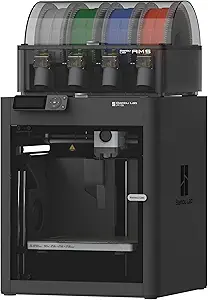
Bambu Lab P1S Combo
This is the Best Overall choice among the featured options for shoppers who want several distinct capabilities in one printer. Its fully enclosed body is described as improving print performance for advanced filaments, and automatic bed leveling is listed as a setup convenience. Those details make it worth considering if you want an enclosed machine and would rather have leveling handled automatically than treat it as a recurring manual task. The label is an editorial pick among these products, not a claim that it is best for every project or every shopper.
For color or material changes within a design, the listing specifies up to 16 colors and multi-material printing, with an important qualification: connecting Bambu Lab AMS is required. Because this is a Combo listing, check the exact offer details to establish which components are included rather than assuming what the package contains. This distinction matters during Black Friday, when a headline may foreground the printer name while the configuration determines whether the capability you want is ready to use. If color printing is a priority, make AMS part of your listing comparison.
The stated material guidance gives useful boundaries for project planning. PLA, PETG, TPU, PVA, PET, ABS, and ASA are listed as ideal; PA and PC as capable; and carbon or glass fiber reinforced polymer as not recommended. Treat those labels as guidance, not a guarantee for every print or setup. The listed dimensions are 15.31 x 18.03 x 15.31 inches, and the weight is 47.5 pounds, so allow for a suitable location and consider handling before checkout. For a Black Friday comparison, this pick makes sense when enclosure, the stated material range, and potential multi-color work all matter more than choosing by a promotion headline alone.
Key specs
| Multi-color printing | Up to 16 Colors: Bring your designs to life with vibrant multi-color/multi-material printing capabilities, perfect for showcasing your creativity. Note: Connecting Bambu Lab AMS is required. |
| Enclosure | Fully enclosed body improves print performance for advanced filaments. |
| Bed leveling | Auto bed leveling makes 3D printing such an easy thing. |
| Supported filament | Ideal: PLA, PETG, TPU, PVA, PET ABS, ASA; Capable : PA, PC; Not Recommended: Carbon/Glass Fiber Reinforced Polymer. |
| Dimensions | 15.31 x 18.03 x 15.31 inches |
| Weight | 47.5 pounds |
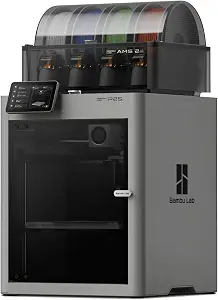
Bambu Lab P2S Combo
Choose this option if built-in filament drying is the feature you most want to resolve in your setup. It is labeled Best for Built-In Filament Drying because its listing specifies drying at up to 65 °C in the AMS. That is a concrete reason to put it on a shortlist if filament drying is part of your regular routine. The label describes its fit among these picks; it is not a claim about drying results, convenience for every material, or superiority in other areas.
The listed print speed is up to 600 mm/s, and the extrusion features include a PMSM Servo Extruder and Active Flowrate Compensation. These specifications may be relevant when comparing the workflows described in the listing, but they do not by themselves tell you how a particular project will turn out. The listing also says that the P2S printer does not support multi-color printing and that the Combo version is required. Since the product offered here is the Combo, still check the exact Black Friday configuration and its package details if multi-color work is central to your plan.
At 18 x 22 x 18 inches and 46.3 pounds, this option calls for a planned location and a realistic assessment of moving and positioning it. Its feature set may suit someone balancing speed specifications with the listed drying feature, rather than someone selecting solely for enclosure or the A1’s automatic calibration details. During Black Friday, compare the actual listing against those priorities: confirm the product variant, verify the drying feature stated for the AMS, and decide whether the dimensions work in your intended space. A promotional label cannot substitute for that fit check.
Key specs
| Dimensions | 18 x 22 x 18 inches |
| Weight | 46.3 pounds |
| Print speed | prints up to 600 mm/s |
| Extrusion features | the PMSM Servo Extruder and Active Flowrate Compensation |
| AMS filament drying | built-in filament drying at up to 65 °C |
| Multi-color configuration | The P2S 3D printer does not support multi-color printing; Combo version required. |
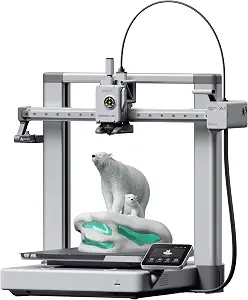
Bambu Lab A1 3D Printer
The Best Budget label points to this option as the budget-oriented editorial pick within this group, not a verified lowest-price claim. Its listed strengths include automatic handling of all calibration processes, active flow rate compensation, and a one-clip quick-swap nozzle. These are practical points to weigh if you prefer a printer listing that explicitly addresses setup and nozzle changes. Whether it is the right choice still depends on the exact Black Friday offer, configuration, and the work you want to do.
For multi-color printing, the listing states that AMS lite is required; it directs shoppers to get the A1 Combo or buy AMS lite separately. Do not assume the printer listing by itself includes the additional equipment needed for that use. Check the exact variant and package contents before comparing a Black Friday offer, particularly if color is the reason you are considering it. The product’s stated acceleration is 10,000 mm/s², but that specification alone does not establish how quickly any particular model or project will finish.
The dimensions are 21.76 x 20.83 x 12.87 inches, and the item weight is 22 pounds. Those figures can help you think through placement and handling, but the available facts do not establish how much clearance your specific setup requires. This is a sensible candidate to investigate when automatic calibration, flow rate compensation, or quick nozzle changes match your routine. If your priority instead depends on an enclosure or built-in filament drying, compare those stated features directly with the other listings. For Black Friday, judge the exact offer and needed configuration rather than treating the Best Budget label as a promise about price.
Key specs
| Dimensions | 21.76 x 20.83 x 12.87 inches |
| Item weight | 22 pounds |
| Acceleration | acceleration of 10,000 mm/s² |
| Multi-color printing | AMS lite required, get A1 Combo or buy AMS lite seperately. |
| Calibration | The A1 3D printer takes care of all the calibration processes automatically |
| Flow rate compensation | active flow rate compensation |
| Nozzle | The 1-Clip quick swap nozzle |
Start with the kind of prints you expect to make
A useful comparison begins with a project, not a spec sheet. If you are planning colorful designs, first check which listed configuration supports that workflow: the P1S Combo’s listing describes up to 16 colors with Bambu Lab AMS required, while the A1 requires AMS lite and points shoppers to the A1 Combo or a separately purchased AMS lite. The P2S listing says multi-color printing requires the Combo version and that the standard P2S does not support it. These distinctions make the precise variant central to the decision.
For projects involving materials, the P1S listing is the one here that spells out specific guidance: several materials are described as ideal, two as capable, and carbon or glass fiber reinforced polymer as not recommended. If your planned prints rely on a particular material, read that guidance closely rather than assuming that a feature listed for one printer applies to another. A Black Friday price or bundle headline cannot answer whether the stated configuration matches your project. Write down your must-have materials or color workflow, then use the exact listing to confirm what you would be selecting.
Read Black Friday configurations as carefully as features
A product name and a capability statement do not always tell you what is in a particular package. Multi-color printing is tied to additional AMS equipment in the P1S and A1 information, while the P2S listing distinguishes the printer from its Combo version. Make that distinction part of your comparison: identify the exact variant shown on the offer page, then verify that it corresponds to the color setup you intend to use. Do not infer included accessories from a feature description alone.
This is especially useful when Black Friday listings emphasize a bundle or use a short model name. Compare the product variant and the stated feature requirements before considering any promotion. If an offer does not clearly resolve whether the required AMS component is included or which version is being sold, treat that uncertainty as a reason to inspect the listing further, not as confirmation. Keep the decision grounded in what the offer actually identifies. That way, you compare like with like instead of letting a headline make a configuration choice for you.
Decide which routine you want the printer to simplify
Convenience features matter most when they address a task you would otherwise have to manage. The P1S lists automatic bed leveling; the A1 says it handles all calibration processes automatically and also lists active flow rate compensation. The P2S calls out a PMSM Servo Extruder, Active Flowrate Compensation, and filament drying in the AMS at up to 65 °C. Consider which of these stated features relates to work you actually expect to do. A long feature list is not automatically a better fit if its details do not matter to your routine.
Use Black Friday comparisons to resolve that practical question rather than to collect features without a purpose. For example, if filament drying is the deciding point, confirm that the precise listing is the one whose AMS feature description you want to consider. If calibration is your main concern, compare the stated A1 calibration detail against the other priorities you have written down. The available facts do not establish that one convenience feature replaces another, so keep each one in its own lane. A clear task-based choice can make an offer easier to assess without assuming performance beyond the listing.
Allow for the actual space and handling needs
Before committing to a printer, look at the dimensions and weight supplied for the specific option. The P1S is listed at 15.31 x 18.03 x 15.31 inches and 47.5 pounds; the P2S at 18 x 22 x 18 inches and 46.3 pounds; and the A1 at 21.76 x 20.83 x 12.87 inches and 22 pounds. These are the listed measurements and weights, not a statement about the additional clearance or furniture your setup may require.
Picture the intended location and think through how the printer will get there. Check the space available against the exact dimensions, and consider whether the listed weight is manageable for your placement plan. This is worthwhile even when a Black Friday offer seems compelling: a suitable price does not make a poor physical fit workable. The numbers also should not be treated as direct proof that one printer is easier to position in every room, since your route, surfaces, and available space are individual. Use them as a prompt to measure and plan before checkout.
Make a Black Friday decision with a short evidence checklist
Before comparing offers, make a compact checklist of what the listing must establish. Include the exact product variant, the color-printing equipment required for your plan, any material guidance that affects your projects, and the feature you most want to use. Add the physical measurements and weight if placement is a concern. Then review each live offer against that list. This approach keeps a Black Friday comparison focused on meaningful differences rather than assumptions about discounts, availability, or package contents.
Keep the distinction between a stated feature and an unresolved detail clear. For example, the product facts identify AMS or AMS lite requirements for color workflows, but the offer page is where you should confirm the exact configuration being sold. If a listing detail is unclear, do not fill in the gap based on a model name or promotional wording. Compare only what is specified and decide whether the remaining uncertainty matters to you. A shortlist built this way is easier to revisit, and it helps ensure the final choice reflects your requirements rather than the urgency of a sale message.
Make your Black Friday choice
The right Bambu 3D printer depends on what you want it to do and what the exact offer includes. Favor the P1S when its enclosure, stated material guidance, and AMS-dependent color capability match your plans; consider the P2S when its listed drying feature is central; and look at the A1 when its calibration and nozzle details suit your routine. Before checkout, confirm the variant, required color equipment, listing-specific feature details, dimensions, and weight. For Black Friday, compare the live offer against that checklist rather than assuming a banner guarantees the right package or a worthwhile fit.