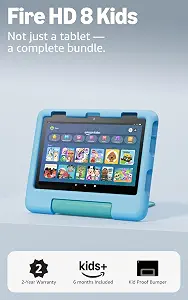
Amazon Fire HD 8 Kids tablet, ages 3-7
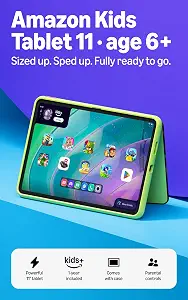
Amazon Kids Tablet 11
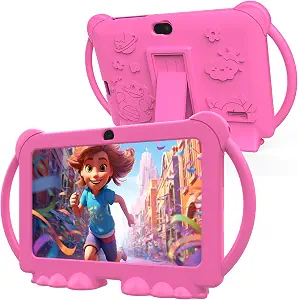
PEICHENG Kids Tablet 7 inch Android 12.0 for Toddler
Best Kid Tablet Buying Guide — Black Friday Deals 2026
A kid tablet can be a shared household screen, a way to occupy a quiet stretch, or a device for a child to use more independently. Start by deciding which of those jobs matters, then compare display, app access, included accessories and family settings rather than shopping by one headline feature. This guide covers three distinct choices: the Amazon Fire HD 8 Kids tablet for ages 3-7, the Amazon Kids Tablet 11 with Google Play access, and the PEICHENG seven-inch Android tablet. Black Friday may bring changing offers, but no deal should substitute for checking the exact model and package. Use the details here to make a shortlist, then verify the live listing before deciding.
Amazon Fire HD 8 Kids tablet, ages 3-7
The Amazon Fire HD 8 Kids tablet is our Best Overall pick among these options for shoppers who want an age-positioned tablet with a defined set of family-oriented details. The product is identified for ages 3-7 and has an 8" HD display, making its screen size a useful starting point if you are choosing a device for younger children rather than looking for the largest panel in this group. Its included Amazon Kid-Proof Case has a stand/handle, so the package already specifies a way to prop up or carry the tablet. Consider whether those details fit the way a child will use it at home or while traveling; the facts do not establish how any child will handle a device.
For everyday planning, the listed 4 GB RAM and 64GB storage answer different questions: one is memory, while the other is space for stored content. Storage can be expanded up to 1 TB, which may matter if you expect the built-in capacity to be a constraint. The tablet is wifi-enabled, so consider where a connection is available for the activities you have in mind; the listing facts do not specify how individual apps behave without a connection. Battery life is stated as up to 13 hours, a qualified figure rather than a promise that every routine or use pattern will reach that duration.
Set time limits is the stated parental-control feature, a relevant detail for families who want to consider time boundaries as part of setup. It does not, by itself, describe every kind of content or account control, so check the listing for any other settings you need. The Best Overall label is an editorial choice among the products here, not a claim of tested superiority. During Black Friday shopping, compare the exact Fire HD 8 Kids tablet offer and included case rather than assuming every listing has the same package. This pick makes sense to shortlist when the listed age range, expandable storage, case and time-limit setting align with your priorities.
Key specs
| Display | 8" HD display |
| Memory | 4 GB RAM |
| Storage | 64GB storage |
| Expandable storage | up to 1 TB of expandable storage |
| Battery life | up to 13 hours |
| Connectivity | wifi-enabled tablet |
| Included case | Amazon Kid-Proof Case with stand/handle |
| Parental controls | set time limits |
Amazon Kids Tablet 11
Check Price on Amazon
The Amazon Kids Tablet 11 is our Best for a Larger Display and Google Play Access pick. Its 11” 2.5K display is the largest display size among the listed products, and the product facts also specifically state access to Google Play Store. Those are two separate reasons to consider it: one concerns the screen, while the other concerns app access. If your choice depends on a particular app, verify that app and its requirements in the current listing rather than treating store access as a guarantee that every app will suit your needs.
The tablet has 8GB RAM and 64 GB of storage. Keep those figures in their own categories when comparing options: storage describes capacity, while RAM is listed as memory. A slim protective case is included, and the built-in kickstand props the tablet up in portrait or landscape. That arrangement may be useful when a child watches or uses the screen while it is propped on a surface, although the facts do not specify viewing angles or how the case performs in a particular setting. The product also includes a 1-year Kids+ subscription. Check what that subscription means for your household and whether its included period matches your plans; do not assume the subscription covers every app or service you might want.
Battery information is stated as up to 15 hours of video playback. Keep the activity qualification attached when comparing it with another product's battery wording; it is not a universal runtime claim for every task. The Best for a Larger Display and Google Play Access label highlights those provided features, not measured superiority. Black Friday can make it tempting to focus on the offer headline, so confirm that the selected listing is this tablet and that its included subscription and case match what you expect. It is a strong shortlist candidate when the larger display, stated app-store access and included stand are relevant to your household.
Key specs
| Display | 11” 2.5K display |
| Memory | 8GB RAM |
| Included subscription | A 1-year Kids+ subscription included |
| App access | Access to Google Play Store |
| Battery | Battery provides up to 15 hours of video playback |
| Storage | 64 GB of storage |
| Case | Slim protective case included |
| Stand | The built-in kickstand props it up in portrait or landscape. |
PEICHENG Kids Tablet 7 inch Android 12.0 for Toddler
Check Price on Amazon
The PEICHENG Kids Tablet is our Best Budget choice within this guide, but that editorial label is not a statement about its current price or a Black Friday discount. Its listed configuration gives shoppers a smaller-screen alternative: a seven-inch display with a maximum resolution of 1024*600 pixels. The product name identifies it for toddlers, and the specifications state Android 12. Those details give you a practical basis for deciding whether its screen and operating system fit the intended use. The resolution is useful to compare directly with your expectations; do not assume that a lower or higher number alone settles whether a display is right for a child.
The tablet lists 4 GB of RAM and 32 GB of storage, plus support for a Micro SD card to expand storage up to 512GB. The RAM and storage figures are not interchangeable: consider how much built-in room you want, then separately decide whether expandable storage is useful to you. The facts do not identify a card as included, so verify the package if you expect to use one. Battery capacity is listed as 3267 milliamp_hours. That is a capacity figure, not a stated number of hours of use, so it cannot be directly compared with the other products' runtime wording.
The Best Budget label signals an editorial role among these three products, not a promise that this will be the lowest-priced offer. For Black Friday, compare the exact model and listed package, and decide whether its display resolution, Android 12, storage arrangement and stated battery capacity answer your needs. This may be the option to investigate when a seven-inch screen and expandable storage are more relevant to your decision than the larger display or other included features listed for the alternatives. Check the current listing for details you need that are not covered by the supplied specifications.
Key specs
| Operating system | Operating System Android 12 |
| Display | Display Resolution Maximum 1024*600 pixels |
| Storage | Memory Storage Capacity 32 GB |
| Memory | RAM Memory Installed 4 GB |
| Expandable storage | Supports Micro SD card expand up to 512GB. |
| Battery capacity | Battery Capacity 3267 milliamp_hours |
Which display details matter for your child's routine?
Begin with the setting in which the tablet will be used. A child who mainly holds a device may have different screen preferences from one who usually uses it propped on a table. The Fire HD 8 Kids tablet has an 8" HD display, while the PEICHENG model lists a seven-inch display with a maximum resolution of 1024*600 pixels. The Amazon Kids Tablet 11 lists an 11” 2.5K display. Treat size and resolution as distinct pieces of information: screen dimensions describe scale, while resolution describes a display characteristic. Neither specification alone tells you what a child will prefer.
Think through the content and viewing situation you have in mind, then decide whether the listed screen details answer your questions. If you need to compare how a specific app or video appears, look for that information in the current product details rather than assuming from the headline alone. During Black Friday, keep the product variant in view while comparing offers; a screen-size number is helpful only when it belongs to the exact tablet you intend to buy. Avoid choosing a larger display simply because its number is larger if a different form factor better suits your planned use.
You can also use the included support details as context. The Fire HD 8 Kids tablet's case has a stand/handle, and the Amazon Kids Tablet 11 has a built-in kickstand for portrait or landscape positioning. These descriptions tell you what support features are listed, but not how a device will fit every surface or viewing position. Check whether the relevant arrangement matches where the tablet is likely to sit.
Ask what app access and family settings are actually stated
App access, subscription inclusions and parental settings answer different questions. The Amazon Kids Tablet 11 lists access to Google Play Store and includes a 1-year Kids+ subscription. Before choosing it, identify the apps or services your household wants to use and verify the details that matter in the current listing. Store access does not establish that every specific app is included in a subscription, and the subscription description should not be treated as a complete account of all available content.
For the Fire HD 8 Kids tablet, the supplied parental-control detail is that users can set time limits. That is a concrete point to consider if time boundaries are part of your setup, but it does not describe every possible family setting. The available facts for the other products do not specify equivalent controls, so compare the exact listings rather than assuming features are shared or missing. Make a short list of the settings you need, then look for each one by name.
Black Friday offer pages can emphasize bundles, so read each included item separately. Confirm which product includes the Kids+ subscription, which one lists a case, and which one specifies a time-limit setting. If a particular app, subscription term or control is essential, treat it as a check before purchase rather than an assumption based on the product name. This keeps the decision tied to details you can verify.
Sort storage capacity from RAM before comparing configurations
Storage is room for saved material; RAM is a separate memory specification. The Fire HD 8 Kids tablet lists 4 GB RAM and 64GB storage, while the Amazon Kids Tablet 11 lists 8GB RAM and 64 GB of storage. The PEICHENG tablet lists 4 GB RAM and 32 GB of storage. These figures let you compare the stated configurations, but they do not independently establish how a device will perform for a particular app or household. Start by deciding whether storage capacity is a priority, then consider RAM separately.
Expansion is another distinct question. The Fire HD 8 Kids tablet supports up to 1 TB of expandable storage, and the PEICHENG tablet supports Micro SD card expansion up to 512GB. The facts provided for the Amazon Kids Tablet 11 state 64 GB of storage but do not specify an expansion figure. Do not assume an expansion feature or card inclusion beyond what the exact listing says. If you plan to use a card, check the live offer for the relevant package detail and confirm the stated support applies to the selected model.
A Black Friday headline may focus on one capacity number, but the right comparison is the complete storage arrangement. Ask how much built-in storage you want, whether expandable storage is important, and whether the package includes anything you expect to need. Keep those answers distinct from your RAM preference so that a larger number in one category does not distract from a requirement in another.
Interpret battery wording in light of the activity
Battery claims are useful only when you keep their wording intact. The Fire HD 8 Kids tablet is listed with battery life of up to 13 hours. The Amazon Kids Tablet 11 states up to 15 hours of video playback. The first figure is phrased as battery life, while the second explicitly names video playback. Do not turn either into a guarantee for every activity, setting or day, and do not treat the two descriptions as perfectly identical measures.
The PEICHENG tablet lists a battery capacity of 3267 milliamp_hours rather than a runtime duration. Capacity and hours of use are different types of information, so the number cannot tell you directly how long it will last in a particular routine. If battery duration is central to your decision, check the product listing for more detail that applies to the activity you expect. Consider when and where a child will use the tablet, without assuming that any listed maximum will match those circumstances.
For Black Friday comparisons, write down the battery wording alongside the exact model instead of ranking products by the largest-looking number. This helps prevent a video-playback figure from being read as an all-purpose promise, or a capacity figure from being mistaken for hours. If you need a specific runtime expectation, make that a question to resolve from the current listing before selecting an offer.
Use the live Black Friday listing to confirm the whole package
Treat the product page as a final fit check, not just a place to look at the offer headline. Confirm the exact model name and the variant selected, then make sure the specifications you used to shortlist it appear on that same listing. This matters when you are comparing a Fire HD 8 Kids tablet with an Amazon Kids Tablet 11 or the PEICHENG Kids Tablet: similar category language does not make their configurations interchangeable.
Review the included items individually. The Fire HD 8 Kids tablet lists an Amazon Kid-Proof Case with stand/handle. The Amazon Kids Tablet 11 lists a slim protective case, a built-in kickstand and a 1-year Kids+ subscription. For the PEICHENG tablet, verify any package contents you care about because the provided facts do not list them. During Black Friday, do not infer that an accessory or subscription is included just because it appears in product imagery or in an offer description; confirm it in the selected listing.
Finally, check the details that matter most to your household: display, storage and expansion, app access, time limits, or battery wording. Compare the exact offer against that checklist, and avoid assuming a discount, stock status or bundle from a headline. A current listing is the place to verify what is actually being offered.
Make your Black Friday choice
The best choice depends on which stated features solve a real need in your household. Consider the Fire HD 8 Kids tablet for its listed age range, expandable storage, case and time-limit setting; the Amazon Kids Tablet 11 for its larger display, Google Play access and included subscription; or the PEICHENG model for its seven-inch display, Android 12 and expandable-storage support. These are editorial distinctions, not claims of measured superiority. Black Friday is a useful moment to compare exact offers, but verify the selected model, included items and details before you decide. Let your shortlist guide the final check rather than letting the promotion headline make the choice for you.