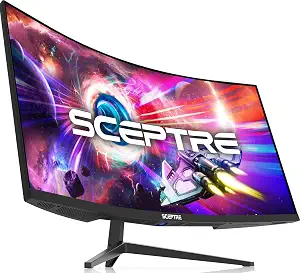
Sceptre 34-inch Curved ultrawide WQHD Monitor (C345B-QUT168)
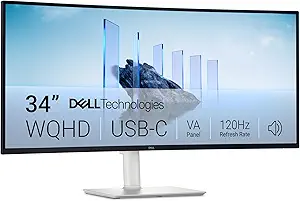
Dell 34 Monitor S3425DW
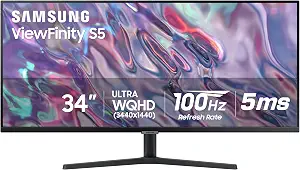
SAMSUNG 34" ViewFinity S50GC Series Ultra-WQHD Monitor
Best Size34Inch Monitor Buying Guide — Black Friday Deals 2026
What do you want a 34-inch ultrawide to make easier: keeping several windows in view, connecting a laptop, or giving motion-focused gaming a place on your desk? Those needs point to different details, even among monitors with the same screen size and 3440 x 1440 resolution. The Sceptre pairs that resolution with a 165 hertz refresh rate, while the Dell lists USB connectivity and up to 65W power delivery. Samsung adds a picture-in-picture style workflow through PBP, which can show input from two simultaneous sources at native resolution. Use this guide to match those distinctions to your routine, then treat Black Friday as a chance to check the exact model and offer—not as a reason to buy a screen that misses your needs.
Sceptre 34-inch Curved ultrawide WQHD Monitor (C345B-QUT168)
Check Price on Amazon
The Sceptre C345B-QUT168 is the Best Budget pick in this guide for shoppers whose main priority is a gaming-oriented motion specification at a 34-inch ultrawide size. Its listed 165 hertz refresh rate and 1ms MPRT response time give you specific figures to compare against your own priorities. The screen has a 3440 x 1440 resolution and a 21:9 aspect ratio. That combination makes it worth considering if you want a wide desktop for games or everyday work, while remembering that the listing’s figures alone do not determine how a particular game or computer will look or feel.
For a practical desk plan, think about whether the wide format suits the applications you use and whether your computer can connect through the ports you intend to use. The Sceptre lists 2 x HDMI Port, 2 x DP Port. Those details let you compare its connection options with your devices before checkout; do not assume a cable or adapter is included unless the exact listing says so. Its listed specifications do not state USB connectivity or power delivery, so check the listing directly if either is essential to your setup rather than drawing conclusions from the information here.
The Best Budget label is an editorial fit among these three choices, not a claim about a sale price or measured value. During Black Friday, compare the exact C345B-QUT168 listing and confirm the configuration you are considering, since an offer headline by itself does not establish which model or variant is included. This monitor makes the most sense on a shortlist when its 165 hertz refresh rate and 1ms MPRT response time matter to you and its HDMI and DP connections match your plan. If your priority is instead USB power delivery or viewing two sources at once, compare the Dell and Samsung details before deciding.
Key specs
| Screen size | 34 inches |
| Resolution | 3440 x 1440 |
| Aspect ratio | 21:9 |
| Refresh rate | 165 hertz |
| Response time | 1ms MPRT |
| Connectivity | 2 x HDMI Port, 2 x DP Port |
Dell 34 Monitor S3425DW
The Dell 34 Monitor S3425DW earns the Best Overall label here because its listed details speak to a broad desk decision: a 34-inch screen, 3440 x 1440 maximum resolution, HDMI and USB connectivity, and up to 65W power delivery. That combination is relevant if you are weighing screen format alongside device connections and charging needs. The listing also gives a 120 hertz refresh rate and a 3000:1 contrast ratio, so shoppers can consider image and motion specifications together rather than choosing by diagonal size alone. The label is an editorial recommendation among these featured products, not a test result or a promise that it suits every desk.
Before choosing it, map your intended setup. Identify which devices you expect to connect, which connection types they use, and whether the stated USB-C power delivery is useful for your routine. The product facts specify up to 65W power delivery, but they do not establish that every laptop will charge at that level or that a particular cable is included. Check the exact listing and your device requirements. The HDMI and USB connectivity may be relevant to your connection plan, but confirm the ports and included accessories in the configuration offered rather than relying on assumptions.
Black Friday can make the Dell worth revisiting if the model already fits your desk, but the offer should be checked against the exact S3425DW listing and configuration. Do not treat a promotional headline as evidence that a specific feature, accessory, or variant is part of the offer. Choose this option when its balance of resolution, refresh rate, contrast ratio, and stated power delivery aligns with what you need; choose another when a more specific feature is the deciding factor. In particular, compare the Sceptre’s listed motion figures or Samsung’s PBP feature if either is central to your intended use.
Key specs
| Screen size | Screen Size 34 inches |
| Resolution | Display Resolution Maximum 3440 x 1440 |
| Refresh rate | Refresh Rate 120 hertz |
| Panel contrast | Contrast Ratio 3000:1 |
| Connectivity | Connectivity Technology HDMI, USB |
| USB-C power delivery | up to 65W power delivery |
SAMSUNG 34" ViewFinity S50GC Series Ultra-WQHD Monitor
Check Price on Amazon
The SAMSUNG 34-inch ViewFinity S50GC Series Ultra-WQHD Monitor is the Best for simultaneous-source viewing choice. Its PBP feature can show input from two simultaneous sources at native resolution, making it a candidate for a desk routine that involves keeping two inputs visible together. The screen is 34 inches, with a 3440 x 1440 resolution and 21:9 aspect ratio. Those specifications establish the format; PBP is the distinctive workflow detail to weigh if viewing separate sources together matters more to you than a higher listed refresh rate.
The monitor’s other listed details include a 100 hertz refresh rate, 5 milliseconds response time, matte screen finish, HDR10, and FreeSync. Consider each in the context of what you actually do: the refresh and response figures are motion specifications, while the matte finish, HDR10, and FreeSync are separate listed features. Their presence does not guarantee a particular result with every device, setting, or application. Before purchasing, check the exact listing for the connection details and confirm that your intended sources can be connected in the way you plan to use PBP; the supplied facts do not specify the port arrangement.
For Black Friday, this Samsung is worth comparing when simultaneous-source viewing is a real part of your work or home setup, rather than simply a feature that sounds useful. Verify the exact S50GC listing and variant, and check that the offer applies to the model you intend to buy. Its 100 hertz refresh rate and 5 milliseconds response time may also matter when you compare it with the other options, but avoid treating those figures as a complete verdict on the viewing experience. Pick it for the stated PBP use case; if you will not use two inputs together, let other priorities guide the shortlist.
Key specs
| Screen size | 34 inches |
| Resolution | 3440 x 1440 pixels |
| Aspect ratio | 21:9 |
| Refresh rate | 100 hertz |
| Response time | 5 milliseconds |
| Screen finish | Matte |
| Picture quality | HDR10 |
| Adaptive sync | FreeSync |
| Multi-source viewing | With PBP, view input from 2 simultaneous sources at native resolution |
Start with the moments when a wider desktop helps
A 34-inch screen is not automatically the right choice just because it offers more horizontal room than a smaller display. First picture a normal work session: do you regularly keep a document beside a reference window, monitor a timeline, or switch between separate tasks? If that kind of side-by-side arrangement is useful, the 21:9 aspect ratio listed for the Sceptre and Samsung is a concrete point for comparison. If your desk routine is mostly one full-screen task at a time, consider whether an ultrawide format would change your day enough to justify making it the center of your setup.
Gaming, office work, and mixed use can lead to different priorities. The Sceptre lists 165 hertz and 1ms MPRT; the Dell lists 120 hertz; Samsung lists 100 hertz and 5 milliseconds. These are product specifications, not a substitute for thinking about the software and devices you use. Decide which details you would actually notice or use, then check that your source device and intended connection fit your plan. This simple use-case check can keep a Black Friday search focused on suitable models rather than on whichever headline appears most compelling.
Keep resolution and motion in separate columns
All three monitors list 3440 x 1440 resolution, though the Dell fact describes it as maximum display resolution. That shared detail can help narrow the format question, but it does not make the monitors interchangeable. The Sceptre also lists a 21:9 aspect ratio, as does Samsung. Once the resolution is clear, compare motion specifications separately: the Sceptre lists a 165 hertz refresh rate and 1ms MPRT response time; Dell lists 120 hertz; Samsung lists 100 hertz and 5 milliseconds. Keep the source wording intact when comparing, especially because MPRT and a response-time figure should not be casually treated as identical measures.
Ask what kind of activity makes motion details important to you, and avoid deciding from one number in isolation. Your intended games, computer, connection, and settings all belong in the decision, but the provided product details cannot tell you how an individual setup will perform. If motion is not your primary concern, other listed features may carry more weight: Dell gives a 3000:1 contrast ratio and up to 65W power delivery, while Samsung lists HDR10, FreeSync, and PBP. A Black Friday offer is worth considering only after you have decided which specifications earn a place on your personal shortlist.
Make a connection map before comparing desk setups
Write down the devices you want to use with the monitor and the connections each one requires. The Sceptre lists 2 x HDMI Port, 2 x DP Port. Dell lists HDMI and USB connectivity, alongside up to 65W power delivery. Those are different descriptions, so compare them with the exact ports and charging arrangement your devices call for. Samsung’s provided details do not give a port list; if that model is on your shortlist, inspect its exact listing rather than assuming a connection type based on the product name or category.
Power delivery deserves its own question. If you hope to reduce the number of separate power connections on your desk, Dell’s stated up to 65W power delivery is relevant, but confirm the requirements of the device you would connect and the exact listing details. The specification does not establish compatibility with every device or confirm what accessories come in the box. Similarly, do not assume that every advertised connection will suit every workflow without checking your computer’s outputs. Doing this homework before Black Friday browsing helps distinguish a genuinely useful offer from one that still leaves you needing a different connection plan.
Use Black Friday to confirm a model, not chase a headline
Treat Black Friday as a moment to recheck a candidate you have already matched to your needs. Start with the full model name: C345B-QUT168, S3425DW, or ViewFinity S50GC Series. Then make sure the listing you are viewing is for that exact model and inspect the offered configuration. A category label or promotional message cannot establish which variant an offer covers. Since no sale price or discount is provided here, compare the live listing directly and judge the offer using the details that matter to your setup.
Next, return to your shortlist criteria. If you chose the Sceptre for its listed refresh rate and HDMI and DP connections, verify that the offer is for the C345B-QUT168. If the Dell’s up to 65W power delivery shaped your choice, confirm the S3425DW and check the details relevant to your device. If Samsung’s PBP was the deciding feature, make sure the listing is the S50GC model you intended to consider. This model-first routine keeps a Black Friday decision grounded in a known product fit instead of an unverified claim about savings or included features.
Give each extra feature a job in your routine
A useful feature is one you can connect to a specific task. Samsung’s PBP is especially clear: it supports viewing input from two simultaneous sources at native resolution. That may suit a routine where you want separate inputs visible together, but if you have no such use, it may not affect your decision. Dell’s up to 65W power delivery is similarly worth prioritizing when it matters to your device and desk arrangement. Check your own requirements rather than assuming that a listed specification solves every charging or connection need.
Other details can help you refine a choice without becoming a checklist of features to collect. Samsung lists a matte screen finish, HDR10, and FreeSync. Dell lists a 3000:1 contrast ratio. The Sceptre lists its refresh rate, response time, and HDMI and DP connections. Consider which of those facts addresses an actual preference, and which would simply be unused. During Black Friday, keep that distinction in view: an offer is only a better fit if the exact model and its listed features match what you set out to buy.
Make your Black Friday choice
Before checkout, name your main use, match it to a listed feature, and verify the exact model and configuration in the live listing. Choose the Sceptre when its motion specifications and HDMI and DP connections fit your priorities; choose Dell when its stated USB-C power delivery and other listed specifications suit your setup; choose Samsung when PBP’s two-source viewing has a practical role. Recheck connection needs, device requirements, and the offer itself during Black Friday, without assuming a discount or accessory not shown. A considered choice is less about finding a screen with the longest feature list and more about buying the format and details you will actually use.