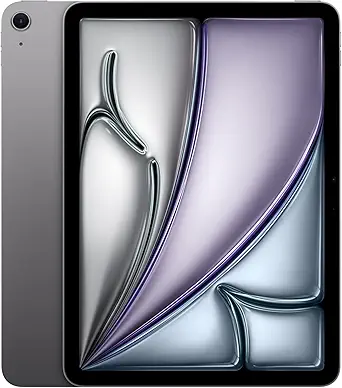
Apple iPad Air 11-inch (M4)
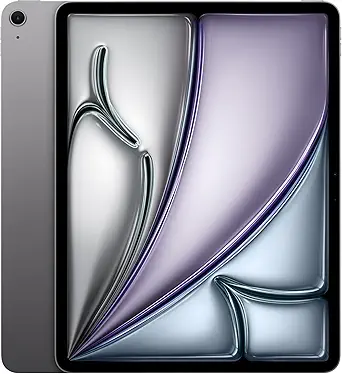
Apple iPad Air 13-inch (M4)
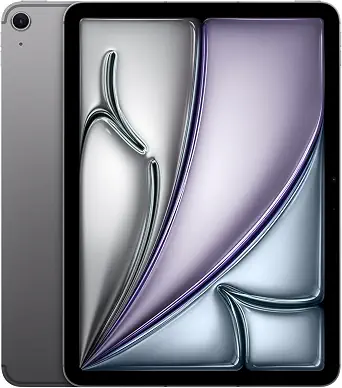
Apple iPad Air 11-inch (M2)
Best Ipad Air Buying Guide — Black Friday Deals 2026
An iPad Air Black Friday shortlist is most useful when it starts with your routine, not a headline offer. These options differ in display size, listed storage and connectivity details, so decide which of those matters most before comparing listings. The M4 models offer an 11-inch or 13-inch Liquid Retina display, while the M2 model lists 512GB of storage and Wi-Fi 6E + 5G Cellular. Treat each Black Friday listing as a specific configuration to verify: match its model, screen size, storage and connection details to the option you meant to consider. The labels here are editorial guides among these products, not proof of a sale or a measured ranking.
Apple iPad Air 11-inch (M4)
Choose the 11-inch iPad Air (M4) if the 11-inch Liquid Retina display better matches the screen size you want to use regularly. It lists 128GB of storage, Wi-Fi 7 with Apple N1, a 12MP Center Stage front camera and a 12MP Wide back camera. Touch ID lets you use your fingerprint to unlock the iPad Air, and the battery is described as offering all-day battery life. These are concrete points to compare with your own habits: for example, ask whether the screen size feels right for reading and whether the listed camera and authentication details matter in your routine.
Its Best Budget label is an editorial role supplied for this guide, not a statement that it has the lowest current price or a confirmed Black Friday discount. No offer price is provided here, so the right way to use the label is as a prompt to examine this configuration when building a cost-conscious shortlist. Compare the live offer with the exact 11-inch M4 model and its 128GB storage, then judge the actual price and terms shown on the listing yourself. A label cannot establish value without the offer in front of you.
The front-camera wording is specific: Center Stage is named for the 12MP front camera, while the back camera is described as 12MP Wide. Keep those descriptions intact rather than assuming they promise a particular result for every call or photo. Wi-Fi 7 with Apple N1 is also the listed connectivity detail; it does not tell you what connection will be available in your location. For Black Friday, verify the model name, screen size and storage before treating a listing as a match. This option makes sense to investigate when an 11-inch display and these stated features fit your plans.
Key specs
| Storage | 128GB |
| Display | 11-INCH LIQUID RETINA DISPLAY |
| Connectivity | Wi-Fi 7 with Apple N1 |
| Front camera | 12MP Center Stage front camera |
| Back camera | 12MP Wide back camera |
| Security | Touch ID lets you use your fingerprint to unlock your iPad Air |
| Battery | all-day battery life |
Apple iPad Air 13-inch (M4)
The 13-inch iPad Air (M4) is a fitting Best Overall choice for a shopper whose shortlist prioritizes a larger listed display and a broad collection of clearly stated features. Its 13-inch Liquid Retina display gives you a larger viewing area to consider for reading, viewing material, or keeping a document in view while working. The Apple M4 chip is specified, but the supplied details do not establish how it compares in performance with another model. Treat the Best Overall label as an editorial way to organize this selection, not as a claim of measured superiority.
This configuration lists 128GB of storage, Wi-Fi 7 with Apple N1, Touch ID and an all-day battery life. Its cameras are described as a 12MP front and back camera. Those details help you decide whether the listed configuration aligns with your priorities: consider the storage against what you expect to keep, and consider the wireless description in light of where you plan to use the tablet. The camera description is a specification, not a promise about results in every setting. Black Friday shoppers should confirm that the offer refers to this 13-inch M4 version, rather than relying on a general iPad Air label.
The screen size may be the deciding question here. Think about whether a larger display suits your usual reading, viewing or work setup, and whether you actually want that much screen in the places you use a tablet. The listed details do not establish weight, dimensions beyond the display size, or accessory compatibility, so check those separately if they affect your decision. Black Friday can make several configurations appear side by side; keep the 13-inch display, M4 name and 128GB storage in your comparison notes. This is the Best Overall pick because its listed screen and feature set make a useful starting point for a general shortlist, not because a promotion or test has proven it best.
Key specs
| Storage | 128GB |
| Display | 13-INCH LIQUID RETINA DISPLAY |
| Chip | Apple M4 chip |
| Cameras | 12MP Front/Back Camera |
| Wireless | Wi-Fi 7 with Apple N1 |
| Authentication | Touch ID |
| Battery | All-Day Battery Life |
Apple iPad Air 11-inch (M2)
The 11-inch iPad Air (M2) earns the Best for More Listed Storage label because this configuration specifies 512GB. That makes storage the first point to weigh: consider the files and material you expect to keep on the tablet, then decide whether this listed capacity suits that plan. The label describes a useful distinction among the featured options; it does not promise that you need more space or that the configuration is a better value. The model name is M2, and the product details also list an 11-inch Liquid Retina display, Touch ID and a USB-C connector.
Connectivity is another reason to give this listing a close read. It specifies Wi-Fi 6E + 5G Cellular. Treat that exact wording as a configuration detail, and consider whether it matches your intended use; the supplied facts do not establish coverage, service terms or connection results. The cameras are described as a 12MP front/back camera. If you care about camera placement or a particular named feature, do not assume details that are not stated here. Black Friday comparisons should distinguish this M2 configuration from an M4 listing, even when both product titles include iPad Air and an 11-inch display.
This model is worth a place on the shortlist when the stated storage capacity or cellular connectivity description is a priority. It may be less relevant if your decision rests mainly on a particular camera feature not named in its listing, or on a different display size; the choice depends on your own priorities, not the label alone. Before following a Black Friday offer, check that the item shown is the M2 version with 512GB and the stated Wi-Fi 6E + 5G Cellular connection. Confirm the actual offer details directly rather than assuming a general iPad Air promotion applies to this exact configuration.
Key specs
| Storage | 512GB |
| Connectivity | Wi-Fi 6E + 5G Cellular |
| Camera | 12MP Front/Back Camera |
| Display | 11-INCH LIQUID RETINA DISPLAY |
| Authentication | Touch ID |
| Connector | USB-C connector |
Turn your tablet routine into a decision order
Before browsing Black Friday offers, write down what you need the tablet to do repeatedly. Is screen area your first concern, or do you care more about how much storage is listed? Would the connection description affect where you expect to use it? Starting with these questions prevents a striking offer headline from changing the requirements you had in mind. The featured iPad Air configurations give you specific facts to compare, but they cannot tell you which tasks matter most in your household or workday.
Next, choose a short list of priorities rather than trying to treat every specification as equally important. A display preference can narrow your choice between the 11-inch options and the 13-inch model. A storage preference can put the 512GB M2 configuration in view, while a preference for the M4 models points you toward their listed chip names. These are ways to organize the options, not claims about which model performs better. If cameras or unlocking matter to you, check their descriptions as well: the 11-inch M4 gives named front and back camera details, and the listed models specify Touch ID.
Only after that should you compare offers. For Black Friday, keep the product name and configuration beside the price shown on the actual listing. Ask whether the displayed offer matches your chosen screen, storage and connectivity details, rather than just the iPad Air family name. This simple order—routine, priorities, exact configuration—helps you make a deliberate comparison without assuming that an advertised deal is automatically the right purchase.
Decide how much display belongs in your setup
The screen question is not simply which option has the larger display; it is where and how you expect to use the tablet. The 11-inch Liquid Retina display appears on both the M4 and M2 options, while the M4 model is also offered here with a 13-inch Liquid Retina display. Think about the viewing area you want for reading, reviewing material or following a task at a desk. These everyday examples can help you picture your preference, but they do not establish that a particular size is better for everyone.
During a Black Friday comparison, resist treating display size as a proxy for other qualities. The provided facts name the display size and type; they do not establish device weight, overall dimensions, or how the screen behaves in a particular room. If those considerations are important, seek them out on the exact product listing before deciding. Keep the exact model name nearby too: the 13-inch option is the M4 model, and the two 11-inch options are an M4 and an M2.
A practical way to settle the question is to imagine your regular settings. If you expect to use the tablet in more than one place, consider the screen you would welcome in each of them. If you mainly picture it open in one familiar spot, ask whether the larger viewing area is worth making your priority. Then use the answer to narrow the Black Friday listings, while leaving storage, connectivity and the offer itself for separate checks.
Make storage a forecast of what you will keep
Storage is easiest to evaluate when you think about your own plans, rather than treating the largest listed figure as an automatic goal. The M4 configurations in this guide list 128GB, and the M2 configuration lists 512GB. Consider what you expect to keep on the device and whether you already have a sense of your typical storage needs. The supplied specifications do not describe the size of your personal library or how much space any particular task will require, so the right answer depends on your own expected use.
Use Black Friday browsing to compare the storage figure on the offer you are actually considering. A product-family heading or promotional image may not be enough to establish which configuration is selected. Read the product name and storage detail together, and pause if either is unclear. This is especially useful when the same family includes models with different screen sizes, chips or connectivity descriptions. A lower displayed price, if you encounter one, does not by itself show that the configuration suits your plans; compare the exact item and price rather than assuming.
Try making a simple personal forecast before opening listings: note whether you expect to keep a modest selection of files or want the listed larger capacity to be part of your shortlist. Do not guess based on a label such as Best Budget or Best for More Listed Storage. Those labels organize this guide; the storage figures are the product facts. Once you have a preference, use it consistently across offers and verify it at checkout.
Keep connection and camera descriptions precise
Connectivity names can shape a shortlist, but they should be read exactly as written. The two M4 models list Wi-Fi 7 with Apple N1. The M2 model lists Wi-Fi 6E + 5G Cellular. Those are separate descriptions, not a guarantee of service in a particular place or a promise about connection results. Think about where you would use the tablet and what kind of connection detail matters to you, then verify the exact version you are comparing.
The camera facts also vary in wording. The 11-inch M4 lists a 12MP Center Stage front camera and a 12MP Wide back camera. The 13-inch M4 and 11-inch M2 descriptions each state a 12MP front/back camera. Do not turn a general description into a feature name that was not supplied, or assume a specific outcome from a camera specification. If your everyday use depends on an exact camera function, check the product listing for that detail before treating it as a deciding point.
For Black Friday, compare the connection and camera wording only after confirming the model and display size. This keeps a familiar family name from obscuring differences between configurations. It also avoids treating Wi-Fi terms as interchangeable or assuming that cellular wording explains coverage, service costs or availability. The useful question is modest: does the stated configuration match what you are seeking, and have you checked the live offer for the same item?
Read the Black Friday offer as a specific configuration
An offer is only comparable when you know which item it applies to. Before drawing a conclusion from Black Friday pricing, match the listing to the model name, display size and storage you shortlisted. Then check connectivity and any other detail that mattered in your decision. This guide does not provide current prices or discounts, and it cannot establish whether a promotion is active. Use the live offer itself to confirm the price and terms rather than assuming a sale based on seasonal wording.
A calm comparison can be done in sequence. First identify whether the listing is the 11-inch M4, 13-inch M4 or 11-inch M2. Next confirm its storage and the connection description. Finally, compare the shown offer with the exact configuration you intended to buy. If a product page or offer display leaves a key detail uncertain, resolve that before deciding. Avoid substituting a broad family label for confirmation of the actual product variant.
The recommendation labels are starting points, not evidence about market-wide rank or the best price. Best Overall, Best Budget and Best for More Listed Storage describe editorial roles among these featured products. In particular, Best Budget does not establish which live offer costs least. Black Friday can be a useful moment to make a careful comparison, but the final choice should rest on the actual configuration and offer details, together with your own priorities.
Make your Black Friday choice
A sensible iPad Air Black Friday purchase starts with the screen and storage you want, then checks the connection and camera details that matter to your routine. The 13-inch M4, 11-inch M4 and 11-inch M2 each give you a different combination of listed features to consider. Use the recommendation labels as shortlist prompts, not as proof of price or performance. Before committing, make sure the live Black Friday offer names the configuration you chose and confirms its details. That final check keeps the decision grounded in your needs and the actual item on offer.