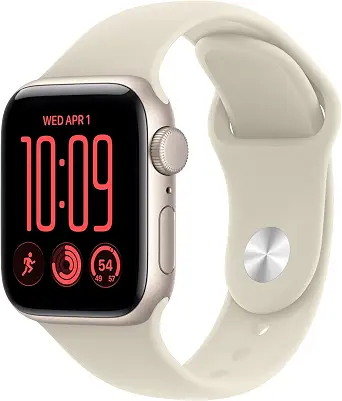
Apple Watch SE 3 GPS 40mm Smartwatch
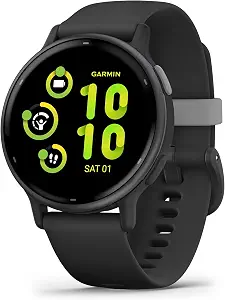
Garmin vívoactive® 5
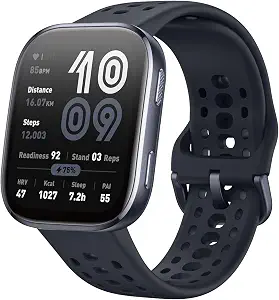
Amazfit Bip 6 Smart Watch
Best Smartwatch Buying Guide — Black Friday Deals 2026
A smartwatch can be a workout log, a place to check selected health information, or a companion for everyday routines—but the useful choice depends on which of those jobs matters to you. This guide compares three watches through the features provided: Apple’s sleep, workout and safety tools; Garmin’s built-in sports apps and health monitoring; and Amazfit’s GPS, water-resistance and battery details. On Black Friday, treat the listing as something to verify, not proof that a deal is worthwhile. Check that the offer is for the exact model and variant you intend to buy, then weigh its stated capabilities against your own priorities.
Apple Watch SE 3 GPS 40mm Smartwatch
For a shopper who wants one watch to bring together everyday activity, sleep and selected safety features, the Apple Watch SE 3 GPS 40mm is the Best Overall pick in this guide. That label reflects the range of relevant capabilities listed here, not a claim of measured superiority. Its workout tracking covers activities from running and strength training to working toward a daily step goal, so it may suit someone who wants to record different kinds of movement rather than focus on only one activity. Consider whether those are the activities you actually want to track before making them a reason to buy.
Sleep tracking adds a sleep score and sleep apnea notifications. Temperature sensing is described as enabling insights in the Vitals app and Cycle Tracking app. These are specific features to consider if sleep or cycle-related information is part of your priorities; they should not be read as a guarantee of a particular health outcome. The watch can also detect a hard fall or severe car crash, help connect you with emergency services, and notify emergency contacts. Those stated capabilities may matter to someone considering safety features, while the listing wording does not establish how every real-world incident will be handled.
Its battery is described as lasting up to 18 hours, with charging up to twice as fast as SE 2 and up to 8 hours of battery in 15 minutes. That combination gives you a useful planning question: does an all-day estimate and a short charging opportunity fit your wear routine? It is not a basis for assuming a longer interval between charges. For connectivity, the GPS version works with an iPhone or Wi-Fi to keep you connected. Check that setup against the connection you expect to use rather than assuming details that are not stated.
The Best Overall label is especially fitting for shoppers considering a mix of sleep, workouts, safety and iPhone-or-Wi-Fi connectivity in one option. During Black Friday, check that the precise listing is for the GPS 40mm model and review the offer details before deciding. The listed features give you a concrete shortlist, but your own priorities should determine whether their combination is useful.
Key specs
| Health tracking | Temperature sensing* enables insights in the Vitals app* and Cycle Tracking app.* |
| Sleep tracking | You can also track your sleep score, get sleep apnea notifications,* and more. |
| Workout tracking | SE 3 can track your workouts in a variety of ways—from running and strength training to achieving your 10K steps a day. |
| Safety features | SE 3 can detect a hard fall or severe car crash, automatically help connect you with emergency services, and notify your emergency contacts.* |
| Battery life | Enjoy a smartwatch with all-day, 18-hour battery life from sunup to sundown.* |
| Charging | Then charge up to twice as fast as SE 2 and get up to 8 hours of battery in just 15 minutes.* |
| Connectivity | SE 3 (GPS) works with your iPhone or Wi-Fi to keep you connected. |
Garmin vívoactive® 5
Check Price on Amazon
Choose the Garmin vívoactive 5 if a broad selection of ready-to-use activity options is central to your shortlist. Its Best for a broad range of built-in sports apps label is grounded in the listed feature of more than 30 built-in indoor and GPS sports apps. That description gives an activity-minded shopper a reason to look more closely, but the number of apps alone cannot tell you whether the specific activities you want are included. Check the available activity options in the exact listing before treating the breadth as a personal match.
A bright, colorful AMOLED display is another stated feature. Think about whether that type of display matters in your day-to-day use, rather than assuming that a description alone answers how it will feel in every setting. Built-in GPS may be relevant if GPS-based sports activities are part of your plans. The supplied details do not specify further navigation functions, so focus your decision on the GPS and sports-app information actually given.
For health-related tracking, the listed tools include wrist-based heart rate, a morning report, fitness age, stress tracking, menstrual cycle and pregnancy tracking, meditation and more. This is a varied set of features to compare with the information you would find useful. Treat each as a tracking or information feature, not a promise of diagnosis or a particular result. If you have a specific health question, the product description alone cannot establish whether its tools answer it.
Battery life is stated as up to 11 days in smartwatch mode. That can help you consider a charging rhythm, but it is an estimate to evaluate against your own routine, not a guarantee of a particular result for every use pattern. The watch can also store favorite music, including playlists from Spotify, Amazon Music or Deezer accounts. If saved music and sports options both matter, consider whether those features align with how you plan to use the watch. On Black Friday, verify the exact vívoactive 5 listing and offer instead of relying on a headline. The sports-app label is a guide to its stated appeal, not a market-wide award.
Key specs
| Display | bright, colorful AMOLED display |
| Battery life | battery life of up to 11 days in smartwatch mode |
| GPS | Built-in GPS |
| Sports apps | more than 30 built-in indoor and GPS sports apps |
| Health monitoring | wrist-based heart rate, morning report, fitness age, stress tracking, menstrual cycle and pregnancy tracking, meditation and more |
| Music | Download your favorite music to your watch, including playlists from your Spotify, Amazon Music or Deezer accounts |
Amazfit Bip 6 Smart Watch
The Amazfit Bip 6 Smart Watch earns the Best Budget label among these featured options. Because no price information is provided here, that editorial label is not a statement that it costs less or that a particular Black Friday offer represents a saving. Its stated features make it a practical candidate to compare when you want built-in GPS, a defined water-resistance rating, and a battery-life estimate in the same shortlist. Check the exact offer and variant before deciding whether it fits your needs.
The watch has a 1.97" AMOLED display with a 390 x 450 resolution. Those exact specifications help identify what the listing describes, but they do not establish how the screen will look to you in your own surroundings. Built-in GPS is listed, which may be relevant if you want GPS as part of your activity setup. The provided information does not detail how the GPS works for particular activities, so keep your comparison focused on that stated capability.
Water resistance is listed as 50 meters. That gives you a concrete specification to compare with your intended use, but it is not a reason to assume suitability for every water-related situation. Read the exact product information and any relevant conditions before relying on it for a particular activity. The watch also lists Blood Oxygen (SpO2), Breath Rate, Calories Burned and Heart Rate as measured metrics. These provide a clear set of tracked information to consider, rather than proof of a health outcome or an answer to every health question.
Battery life is described as up to 14 days. Use that as a planning estimate and ask whether its stated duration suits your own charging habits; the number does not establish how long it will last in every situation. The Best Budget label is therefore about this guide’s editorial grouping, while the decision still rests on the listing and your priorities. During Black Friday, confirm that the offer is for the Bip 6 and review the exact terms and item details. Do not let the label substitute for checking whether its display, GPS, water-resistance rating and tracking metrics are useful to you.
Key specs
| Display | 1.97" AMOLED |
| Display resolution | 390 x 450 |
| GPS | Built-in GPS |
| Water resistance | 50 meters |
| Battery life | up to 14 days |
| Measured metrics | Blood Oxygen (SpO2), Breath Rate, Calories Burned, Heart Rate |
Turn everyday plans into a useful shortlist
Start by writing down what you expect to do with a smartwatch on an ordinary day. A shopper who wants to log varied exercise may give weight to Apple’s listed running and strength-training tracking, while someone comparing a wider selection of built-in sports options may look at Garmin’s more than 30 indoor and GPS sports apps. If GPS is a priority, both Garmin and Amazfit list built-in GPS; Apple’s GPS model is described as working with an iPhone or Wi-Fi to keep you connected. Those statements describe different aspects of the products, so do not treat them as interchangeable promises.
Next, decide whether sleep, health information or safety features belong on your must-have list. Apple names sleep scoring, sleep apnea notifications, temperature sensing and fall or crash detection. Garmin lists a range of monitoring features, including wrist-based heart rate and stress tracking. Amazfit lists several measured metrics, including heart rate and Breath Rate. The presence of a feature is a reason to inspect it, not proof that it answers a medical question or provides a specific outcome.
This priority-first approach is particularly useful during Black Friday, when a prominent offer can distract from the task you need the watch to perform. Decide which listed features would change your day, then check those against the exact model. If no feature clearly matters to you, more items on a product description may not make that option a better fit.
Read health and safety features for what they say
Health-related descriptions can sound broad, so translate them into a list of precise questions. Do you want sleep information, cycle-related insights, activity metrics or a morning report? Apple describes a sleep score and sleep apnea notifications, alongside temperature sensing that enables insights in named apps. Garmin lists menstrual cycle and pregnancy tracking, stress tracking, wrist-based heart rate and other features. Amazfit identifies Blood Oxygen (SpO2), Breath Rate, Calories Burned and Heart Rate as measured metrics. These details help you compare stated capabilities without assuming that every watch provides the same kind of information.
Also separate monitoring from medical conclusions. The supplied descriptions do not establish that a metric diagnoses a condition, replaces professional advice or guarantees accuracy in every circumstance. If a particular health need is driving your purchase, check the exact product information and consider whether the listed feature addresses that need at all. Avoid choosing based only on a long feature list.
Apple’s fall and severe car crash detection description adds a distinct safety consideration: it says the watch can help connect with emergency services and notify emergency contacts. The description is not a promise about every incident or response. On Black Friday, keep this distinction in view as you compare listings. A feature that sounds reassuring deserves careful reading, especially when your reason for buying depends on what it can and cannot do.
Plan around how often you want to charge
Battery figures are useful for planning, but each product describes them differently. Apple states up to 18 hours of all-day battery life and also gives a charging detail: up to 8 hours of battery in 15 minutes, with charging up to twice as fast as SE 2. Garmin states up to 11 days in smartwatch mode, while Amazfit says up to 14 days. Keep the wording attached to each figure and do not assume that estimates are directly comparable under conditions not provided here.
Think about your actual schedule. Would you rather account for a daily charging routine, or is a longer stated interval more relevant to when you wear a watch? Does a quick top-up matter to you? Apple’s stated charging detail may help with that particular question, while Garmin’s and Amazfit’s estimates give a different kind of planning information. None of these facts establishes how long a watch will last for every individual pattern of use.
Before a Black Friday purchase, compare the battery specification on the exact listing with the model you intend to buy. Avoid letting the largest number settle the decision by itself: your preferred charging rhythm, the features you plan to use, and the accuracy of the offer details all matter.
Check the activity, display and connection details
If exercise is the main reason for buying, distinguish between an activity list and a particular tracking need. Apple describes workouts including running and strength training. Garmin lists more than 30 indoor and GPS sports apps and built-in GPS. Amazfit also lists built-in GPS. These facts can help you identify which descriptions deserve closer inspection, but they do not specify every supported activity or the details of GPS behavior. Confirm the information relevant to your plans in the listing rather than filling in those gaps.
Display descriptions offer another point of comparison. Garmin names a bright, colorful AMOLED display; Amazfit specifies a 1.97" AMOLED display and a 390 x 450 resolution. Consider whether the listed screen details matter to you, while leaving unprovided qualities—such as how a display appears in a particular setting—open for verification. Apple’s facts supplied here focus on other areas, so do not infer an unlisted display detail.
Connection and content needs may narrow the choice further. Apple’s GPS version works with an iPhone or Wi-Fi to keep you connected. Garmin says favorite music, including playlists from Spotify, Amazon Music or Deezer accounts, can be downloaded to the watch. The information provided does not establish other compatibility or connection details. Use Black Friday as a prompt to check the precise product and service details you rely on, not to assume them.
Use Black Friday listing details as a final check
A Black Friday headline does not identify every detail of the product being offered. Before comparing offers, confirm the model name and the exact variant shown. In this guide, that means distinguishing the Apple Watch SE 3 GPS 40mm, Garmin vívoactive 5 and Amazfit Bip 6 Smart Watch rather than assuming a listing for a related item is equivalent. Check that any specifications you care about appear on the offer you are considering.
Then judge the offer against your shortlist. If the reason you chose Apple was its combination of sleep, workouts and safety descriptions, verify those details for the precise model. If Garmin’s sports apps or downloadable music mattered, check that you are looking at the vívoactive 5. If Amazfit’s listed GPS, water resistance or battery estimate drove your interest, make sure the offer is for the Bip 6. Do not infer an active promotion, savings or stock status from a seasonal label alone.
Finally, compare only the details you can confirm. Read the product name, variant, specifications and the terms displayed with the exact offer; if an important detail is unclear, do not treat it as established. This approach keeps the Black Friday decision grounded in the item you would actually select, rather than a headline that may not answer your practical questions.
Choose a watch for its useful evidence
The strongest choice is the one whose stated features answer your own questions. Apple’s option brings together workout and sleep tracking, named health insights, safety descriptions, and iPhone-or-Wi-Fi connectivity. Garmin emphasizes a broad set of built-in sports apps, health-monitoring features, GPS, and downloadable music. Amazfit sets out GPS, water resistance, measured metrics, display specifications and a battery estimate. Each profile points to a different reason to inspect the listing.
Before completing a Black Friday purchase, revisit your shortlist and ask whether the exact offer supports the use you had in mind. Check the model, variant and relevant specifications, and leave unsupported assumptions out of the decision. The labels in this guide are editorial starting points among these products, not proof of market-wide value. Let your routine and the confirmed details—not the seasonal headline—settle the choice.
Make your Black Friday choice
A good smartwatch shortlist begins with the information you actually want and the activities you expect to track. Compare the Apple, Garmin and Amazfit options against those needs, then verify the precise model and offer details before buying. Black Friday can be a useful time to make that comparison, but a seasonal label is not evidence of a discount or a better fit. Choose only after the listed features and the exact item match your priorities.